awk Isn’t a One-Liner for Cutting Columns
Know awk '{print $2}' for extracting the second column? That is a useful start, but only a small part of the language. awk has its own execution model, associative arrays, functions and control flow. Filtering and aggregating text often takes just one short program.
The name comes from its creators: Aho, Weinberger and Kernighan. The interesting part is the execution model: you add rules to a built-in record-reading loop instead of writing that loop from scratch.
We will work through records and fields, BEGIN/END, arrays and a simple state machine. Then comes the choice: portable awk, gawk extensions or Python.
The Execution Model: Record, Field, Pattern-Action
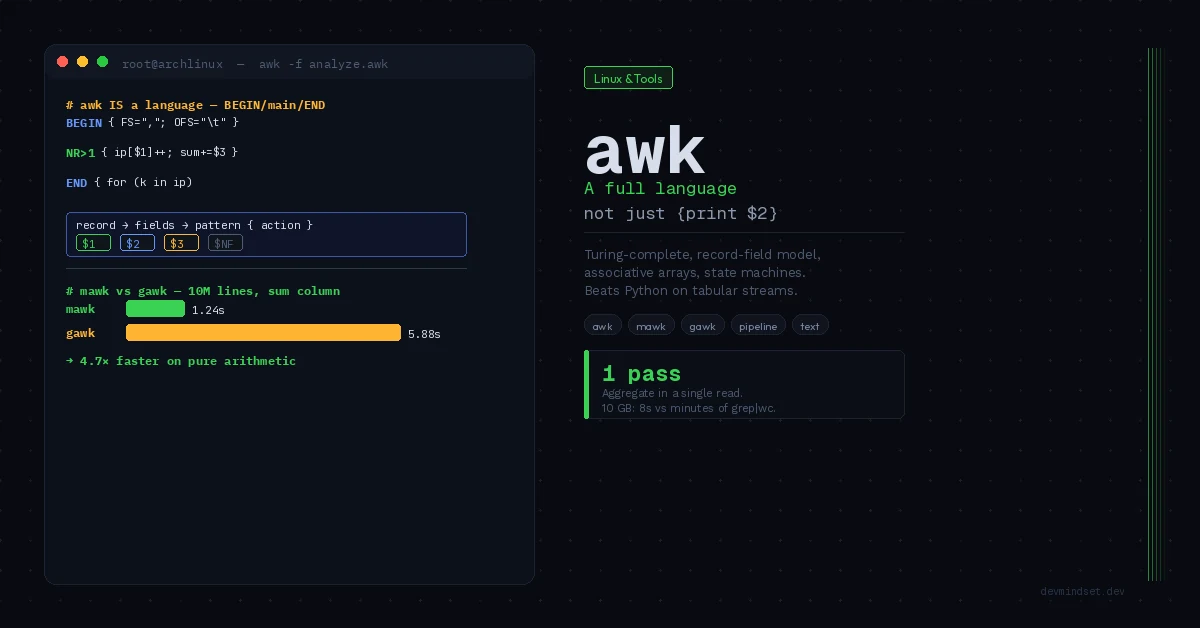
The foundation of awk is a processing cycle that most users run unconsciously. awk reads input record by record (by default, line = record), splits each record into fields (by default on whitespace), and for each record checks a set of pattern → action rules.
# awk program structure: a series of pattern { action } rules
pattern1 { action1 }
pattern2 { action2 }

# If pattern matches the current record → execute the action
# No pattern → action runs for every record
# No action → defaults to { print $0 } (the whole record)
Built-in variables define each record’s context:
| Variable | Meaning |
|---|---|
$0 | The entire current record |
$1, $2, ... $NF | Individual fields (from 1, not 0) |
NF | Number of Fields — field count in the record |
NR | Number of Records — current record number (global) |
FNR | Record number in the current file (resets between files) |
FS | Field Separator — field delimiter (default whitespace) |
OFS | Output Field Separator — delimiter for print |
RS | Record Separator — record delimiter (default newline) |
BEGIN and END Blocks
Two special patterns turn awk from a filter into a full program. BEGIN runs once before the first record, END once after the last. This enables state initialization and result aggregation:
FS="," handles simple comma-separated text. It does not parse full CSV with quoted commas or newlines inside fields. For that, use a CSV parser, such as gawk --csv in a version supporting it.
# Sum and average of the third column — a full program, not a one-liner
BEGIN {
    FS = ","           # separator: comma (CSV)
    OFS = "\t"         # output: tab
    print "Processing..."
}

# Main loop — runs for every record
NR > 1 {              # skip the header (record 1)
    sum += $3
    count++
}

# Runs once, after processing everything
END {
    if (count > 0)
        printf "Sum: %.2f | Average: %.2f | Records: %d\n", \
               sum, sum / count, count
}
Associative Arrays — Where awk Shows Its Claws
Arrays in awk are always associative (hash maps) — indexed by any string, not just a number. This makes awk a natural tool for grouping, counting, and deduplication without any external data structures.
# Counting IP occurrences in an Apache log — a classic production problem
# Input: standard access.log (IP in the first field)

{
    ip_count[$1]++       # array indexed by IP address
}

END {
    # Iterate over the associative array's keys
    for (ip in ip_count) {
        print ip_count[ip], ip
    }
}

# Usage with top-10 sorting:
# awk -f count_ips.awk access.log | sort -rn | head -10
Array-based counting makes one pass over the log and sorts only the aggregated result. The cost is memory for unique IP addresses; with many distinct keys, that can matter more than concise code.
Order-Preserving Deduplication
A problem sort -u won’t solve, because it destroys order. awk does it trivially:
# Remove duplicates, preserve first-occurrence order
# (sort -u would change the order — that's a different result)

!seen[$0]++

# Mechanics: seen[$0] is 0 (false) on first occurrence,
# !0 = true → line printed. Post-increment makes it >0,
# so !seen[$0] = false on subsequent ones → line skipped.
This is idiomatic awk: one line, zero external dependencies, single pass. The expression !seen[$0]++ is a pattern with no action — the default action { print $0 } runs only when the pattern is true.
awk as a State Machine
Here awk crosses the line from “text tool” to full language. Range patterns (/start/,/end/) and state variables allow parsing structured formats — sections, blocks, nesting.
# Section parser in a configuration file (INI format)
# Extract all keys from a specific [database] section

BEGIN { in_section = 0 }

# Detect a section header
/^\[.*\]$/ {
    # Strip brackets, compare section name
    section = substr($0, 2, length($0) - 2)
    in_section = (section == "database") ? 1 : 0
    next        # move to the next record
}

# Inside the target section and the line is key=value
in_section && /=/ {
    pos = index($0, "=")
    kv[1] = substr($0, 1, pos - 1)
    kv[2] = substr($0, pos + 1)
    gsub(/^[ \t]+|[ \t]+$/, "", kv[1])   # trim the key
    gsub(/^[ \t]+|[ \t]+$/, "", kv[2])   # trim the value
    config[kv[1]] = kv[2]
}

END {
    for (key in config)
        printf "%-20s = %s\n", key, config[key]
}
This is a state-machine example for a simple INI subset. It tracks a section and collects key–value pairs, but does not define full comment, escape or multiline-value syntax. Use a parser for the intended format when its grammar is richer.
User-Defined Functions
awk supports custom functions with recursion and local scope — further proof it’s a full language:
# Recursive function: factorial (recursion example)
function factorial(n) {
    return (n <= 1) ? 1 : n * factorial(n - 1)
}

# Function with local parameters (convention: extra params = locals)
function trim(str,    result) {     # 'result' is a local variable
    result = str
    gsub(/^[ \t\r\n]+|[ \t\r\n]+$/, "", result)
    return result
}

BEGIN {
    print factorial(10)              # 3628800
    print "[" trim("  hello  ") "]"  # [hello]
}
Note the convention: awk has no explicit local variables. The idiom is extra function parameters (indented for readability) — they’re initialized to the empty string and act as locals. This is the only way to avoid polluting the global scope.
mawk vs gawk vs busybox awk — Measurement, Not Ideology
Several awk implementations exist with fundamentally different performance characteristics. The choice has real production consequences.
| Implementation | Characteristics | What to check |
|---|---|---|
| mawk | Compact implementation using bytecode | Runtime on your script and data |
| gawk (GNU) | Richest: extensions, Unicode, networking, debugger | Required extensions and their cost |
| busybox awk | Built into embedded systems, minimal | Features in the particular build |
| goawk | Go implementation, good on CSV, portable | Script compatibility and timings on identical data |
# Compare the same script, data, locale and cache state.
LC_ALL=C time mawk '{s+=$1} END{print s}' bignum.txt
LC_ALL=C time gawk '{s+=$1} END{print s}' bignum.txt

# Repeat in a different order and check that results agree.
command -v awk
awk --version  # implementation-specific; supported by gawk
Practical rule: mawk for simple, bulk processing (summing, filtering, counting on gigabyte streams), gawk when you need Unicode, arrays of arrays, gensub(), built-in sorting (asort), or other GNU extensions. On Debian the default awk is often mawk — which means scripts using gawk extensions may fail or behave differently.
awk vs Python — When to Use Which
| Scenario | Choice |
|---|---|
| Filtering/summing columns on a >1 GB stream | awk (mawk) — single pass, minimal overhead |
A shell pipeline (part of cmd | awk | cmd) | awk — native citizen of the Unix pipeline |
| Simple aggregation/grouping in a single pass | awk — associative arrays for free |
| Logic >50 lines, multiple data structures | Python — readability, testability |
| Parsing JSON/XML/nested formats | Python — awk has no native parser |
| Integration with APIs, databases, external libraries | Python — the ecosystem |
| A one-off transformation in the terminal | awk — zero boilerplate, zero imports |
| Production code requiring unit tests | Python — awk is hard to test |
The line is clear: awk wins on tabular streams in a pipeline, where throughput and brevity matter. Python wins when logic grows, nested structures appear, or the code must live long and be maintained. Reaching for Python to do print $2 is over-engineering; writing a JSON parser in awk is engineering masochism.
Practical Example: Log Analysis in a Single Pass
# access.log analysis: status codes and total transfer
# One pass through the file, many aggregations simultaneously

BEGIN {
    OFS = "\t"
}

{
    # Field 9 = HTTP status, field 1 = IP, field 10 = bytes
    status[$9]++
    ip_hits[$1]++
    total_bytes += ($10 ~ /^[0-9]+$/) ? $10 : 0

    if ($9 >= 500) errors_5xx++
    if ($9 >= 400 && $9 < 500) errors_4xx++
}

END {
    print "=== Status Codes ==="
    for (code in status)
        print code, status[code]

    print "\n=== Transfer ==="
    printf "Total: %.2f MB\n", total_bytes / 1024 / 1024
    printf "4xx: %d | 5xx: %d\n", errors_4xx, errors_5xx

    print "\n=== Records processed ==="
    print NR
}
The program computes several aggregates in one pass. It assumes the access-log field layout shown in the comment; it is not a parser for every log format. A version reporting the most frequent IPs is in the examples repository and requires GNU awk, including PROCINFO["sorted_in"].
Conclusion: awk as a Precise Tool, Not a Relic
In awk, the loop over records is part of the language. When the data and rules fit that model, aggregation takes a few readable lines. When exceptions multiply or libraries become necessary, reassess the maintenance cost.
Check the data format and number of unique keys first. Then compare results and runtime: file size alone does not determine the winner.
Related articles
- Bash startup and the cost of .bashrc configuration
- Reading other people’s code and finding entry points
- Debugging through hypotheses
Technical references: GNU awk CSV, POSIX awk.